
File Organizer
Overview
The Advanced File Organizer is a Python application with a Graphical User Interface (GUI) built using Tkinter. It helps users organize files and folders within a specified directory by categorizing them based on file extensions or folder content analysis and moving them into dated subdirectories within a designated output location. It includes features like a dry run mode for previewing changes, configurable options for handling subfolders and duplicates, and a detailed log of actions.
Screenshot
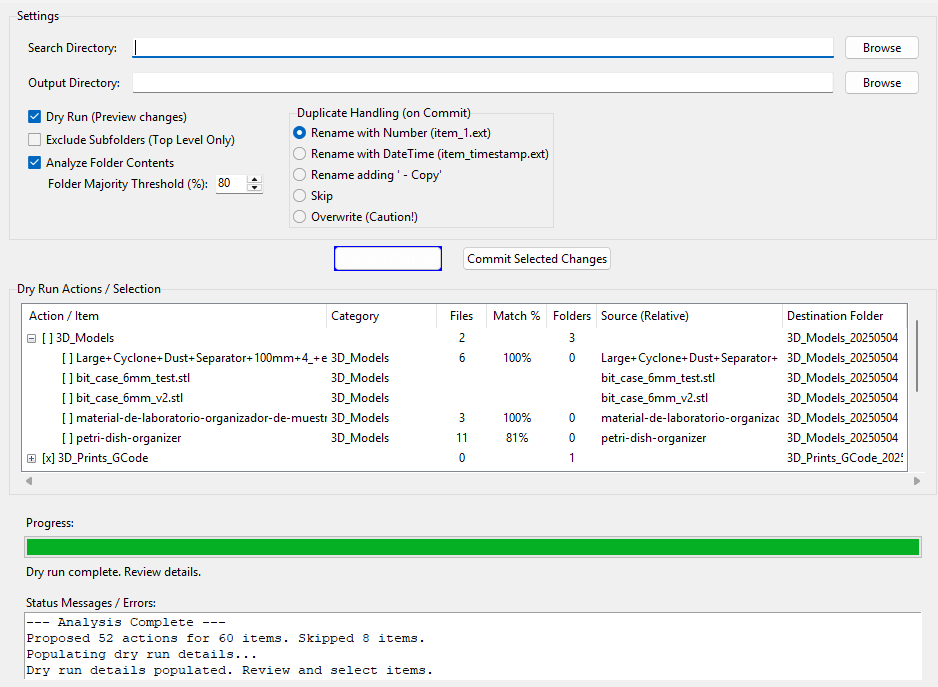 (Image shows the main interface with settings, proposed actions in the treeview, progress bar, and status log)
Features
Graphical User Interface
Easy-to-use interface built with Tkinter.
Directory Selection
Browse buttons to easily select Search and Output directories.
Dry Run Mode
Preview all proposed file/folder movements in a treeview before committing any actual changes. Items can be individually selected or deselected for commitment.
Categorization
- Files are categorized based on their extensions using a customizable mapping.
- Folders can be categorized based on the predominant file types they contain (“Smart Folder Analysis”).
- Includes categories for common file types (Images, Documents, Videos, Code, etc.) and special categories like “Folders” and “Misc”.
Configurable Scanning
- Option to exclude subfolders (process only top-level items).
- Option to enable/disable “Smart Folder Analysis”.
- Adjustable threshold (percentage) for Smart Folder Analysis majority rule.
Duplicate Handling
Choose how to handle items with the same name in the target destination during commit:
- Rename with Number (e.g.,
file_1.txt) - Rename with DateTime (e.g.,
file_20231027_103000123.txt) - Rename adding ’ - Copy’ (e.g.,
file - Copy.txt) - Skip the item.
- Overwrite the existing item (Use with caution!).
Hierarchical Treeview
Displays proposed actions grouped by target category/date folder. Allows expanding/collapsing groups and selecting/deselecting individual items or entire groups using checkboxes.
Context Menu
Right-click (or Ctrl-click on macOS) on items in the treeview for actions like:
- Check/Uncheck item/group.
- Change the proposed category for an item.
- Revert to the originally detected category.
- Re-analyze a specific item.
- Open the source item’s location in the system’s file explorer.
- Copy the source path to the clipboard.
Progress & Logging
- Real-time progress bar during scanning and committing phases.
- Status label providing current operation details.
- Detailed status log window showing actions, warnings, and errors.
Asynchronous Operations
File moving operations are handled asynchronously in a separate thread to keep the GUI responsive.
Cross-Platform Compatibility
Designed to run on Windows, macOS, and Linux (core functionality and file explorer opening).
Requirements
Python 3.x
(Developed and tested with Python 3.7+, uses asyncio, tkinter)
Tkinter
Usually included with standard Python installations. On some Linux distributions, you might need to install it separately (e.g., sudo apt-get install python3-tk).
How to Use
1. Run the Script
Execute the Python script (e.g., python advanced_file_organizer.py).
2. Select Directories
- Click “Browse” next to “Search Directory” and choose the folder containing the files/folders you want to organize.
- Click “Browse” next to “Output Directory” and choose where the organized folders should be created. If the directory doesn’t exist, you’ll be prompted to create it. Note: The Output Directory cannot be the same as or inside the Search Directory.
3. Configure Options
- Dry Run: Keep checked (default) to preview changes first. Uncheck to commit changes immediately after scanning (less common).
- Exclude Subfolders: Check this if you only want to process items directly inside the Search Directory, ignoring any subfolders within it.
- Analyze Folder Contents: Check this (default, unless ‘Exclude Subfolders’ is checked) to enable smart analysis of folder contents to determine their category. Set the Folder Majority Threshold (%) (default 80%) to define how dominant a file type must be to categorize the folder accordingly.
- Duplicate Handling: Select your preferred method for resolving name conflicts when files/folders are moved.
4. Scan
Click the “Scan and Organize” button. The application will scan the Search Directory based on your settings. Progress will be shown.
5. Review (Dry Run)
If Dry Run was enabled, the “Dry Run Actions / Selection” treeview will populate with proposed actions.
- Items are grouped by the target category folder (e.g.,
Images_20231027). - Expand groups to see individual files/folders.
- Items marked
[x]are selected for moving; items marked[ ]are not. Greyed-out items were skipped during analysis (e.g., empty folders, ignored types) and cannot be selected. - Click the checkbox
[ ]/[x]next to an item or group header to toggle its selection state. Toggling a group header affects all enabled children within it. - Right-click items for more options (change category, open location, etc.).
6. Commit Changes
Once you have reviewed and selected the desired actions in the treeview, click the “Commit Selected Changes” button. You will be asked for confirmation.
7. Monitor Commit
The progress bar and status log will update as the selected files and folders are moved to the Output Directory according to your duplicate handling rules.
8. Completion
A final summary will appear in the status log. The treeview will clear, ready for a new scan if needed.
Configuration (Code)
While the GUI provides most options, the core categorization logic can be adjusted in the script:
extension_mapping
A dictionary mapping file extensions (lowercase, including the dot) to category names (strings). You can add, remove, or modify entries here to customize categorization.
self.extension_mapping = {
    # Images
    '.jpg': 'Images', '.jpeg': 'Images', '.png': 'Images',
    # Documents
    '.pdf': 'Documents', '.docx': 'Documents',
    # ... add more or change existing ones
    '.my_custom_ext': 'MyCategory',
}
folders_category
The default category name used for folders when analysis is disabled or content is too mixed.
misc_category
The default category name used for files with unrecognized extensions or other miscellaneous items.
CHECKED_SYMBOL / UNCHECKED_SYMBOL
Symbols used in the treeview.
Buy Me a Coffee
Don’t be shy; if you found this useful, say Hi!

Python Code
import os
import shutil
import datetime
import asyncio
from collections import defaultdict, Counter
import tkinter as tk
from tkinter import filedialog, ttk, messagebox, Menu, IntVar
import threading
import time
import math
import platform
import subprocess
import sys
CHECKED_SYMBOL = "[x]"
UNCHECKED_SYMBOL = "[ ]"
class AdvancedFileOrganizer:
def __init__(self, master):
self.master = master
self.master.title("Advanced File Organizer v2.5.8 - Click Fix")
self.master.geometry("1000x800")
self.search_dir = tk.StringVar()
self.output_dir = tk.StringVar()
self.dry_run = tk.BooleanVar(value=True)
self.exclude_subfolders = tk.BooleanVar(value=False)
self.process_folders_smartly = tk.BooleanVar(value=True)
self.folder_majority_threshold = tk.IntVar(value=80)
self.duplicate_handling_mode = tk.StringVar(value="rename_number")
self.extension_mapping = {
'.jpg': 'Images', '.jpeg': 'Images', '.png': 'Images', '.gif': 'Images',
'.bmp': 'Images', '.tiff': 'Images', '.tif': 'Images', '.eps': 'Images',
'.psd': 'Images', '.webp': 'Images', '.svg': 'Images', '.ico': 'Images',
'.heic': 'Images', '.raw': 'Images', '.xcf': 'Images', '.ai': 'Images',
'.lnk': 'Shortcuts',
'.pdf': 'Documents', '.txt': 'Documents', '.md': 'Documents', '.rtf': 'Documents',
'.doc': 'Documents', '.docx': 'Documents', '.odt': 'Documents',
'.csv': 'Spreadsheets', '.xlsx': 'Spreadsheets', '.xls': 'Spreadsheets', '.ods': 'Spreadsheets',
'.wav': 'Audio', '.mp3': 'Audio', '.aiff': 'Audio', '.aac': 'Audio',
'.wma': 'Audio', '.flac': 'Audio', '.mid': 'Audio', '.midi': 'Audio',
'.m4a': 'Audio', '.ogg': 'Audio', '.m4p': 'Audio',
'.mp4': 'Videos', '.avi': 'Videos', '.mov': 'Videos', '.wmv': 'Videos',
'.flv': 'Videos', '.mkv': 'Videos', '.webm': 'Videos', '.mpg': 'Videos',
'.mpeg': 'Videos', '.aep': 'Videos', '.prproj': 'Videos',
'.stl': '3D_Models', '.ply': '3D_Models', '.3mf': '3D_Models',
'.gcode': '3D_Prints_GCode', '.obj': '3D_Models', '.step': 'CAD', '.stp': 'CAD',
'.iges': 'CAD', '.igs': 'CAD', '.dwg': 'CAD', '.dxf': 'CAD', '.sldprt': 'CAD', '.sldasm': 'CAD',
'.ttc': 'Fonts', '.otf': 'Fonts', '.eot': 'Fonts', '.fon': 'Fonts',
'.ttf': 'Fonts', '.woff': 'Fonts', '.woff2': 'Fonts',
'.zip': 'Compressed', '.rar': 'Compressed', '.7z': 'Compressed',
'.tar': 'Compressed', '.gz': 'Compressed', '.bz2': 'Compressed', '.xz': 'Compressed',
'.exe': 'Executables', '.msi': 'Executables', '.app': 'Executables', '.dmg': 'Installers',
'.py': 'Code', '.java': 'Code', '.cpp': 'Code', '.h': 'Code', '.cs': 'Code',
'.js': 'Code', '.html': 'Code', '.css': 'Code', '.php': 'Code', '.rb': 'Code',
'.sh': 'Scripts', '.bat': 'Scripts', '.ps1': 'Scripts', '.vbs': 'Scripts', '.bash': 'Scripts',
'.ppt': 'Presentations', '.pptx': 'Presentations', '.key': 'Presentations', '.odp': 'Presentations',
'.epub': 'eBooks', '.mobi': 'eBooks', '.azw': 'eBooks',
'.db': 'Databases', '.sqlite': 'Databases', '.sql': 'Databases', '.mdb': 'Databases',
'.vdi': 'Virtual_Machines', '.vmdk': 'Virtual_Machines', '.ova': 'Virtual_Machines', '.vhd': 'Virtual_Machines',
'.indd': 'Design_Publishing', '.qxd': 'Design_Publishing', '.cdr': 'Design_Publishing',
'.iso': 'Disk_Images',
'.json': 'Data_Files', '.xml': 'Data_Files', '.yaml': 'Data_Files', '.yml': 'Data_Files',
'.ini': 'ConfigFiles', '.cfg': 'ConfigFiles', '.conf': 'ConfigFiles', '.config': 'ConfigFiles',
'.bak': 'Backups', '.old': 'Backups', '.tmp': 'Temporary',
'.log': 'Logs', '.syslog': 'Logs'
}
self.folders_category = "Folders"
self.misc_category = "Misc"
self.proposed_moves = []
self.treeview_item_states = {}
self.all_categories = []
self.create_widgets()
self._update_all_categories()
def _update_all_categories(self):
"""Helper to populate the list of unique category names."""
cats = set(self.extension_mapping.values())
cats.add(self.folders_category)
cats.add(self.misc_category)
self.all_categories = sorted(list(cats))
def create_widgets(self):
settings_frame = ttk.LabelFrame(self.master, text="Settings", padding=(10, 5))
settings_frame.grid(row=0, column=0, columnspan=4, padx=10, pady=5, sticky="ew")
settings_frame.columnconfigure(1, weight=1)
ttk.Label(settings_frame, text="Search Directory:").grid(row=0, column=0, padx=5, pady=5, sticky="w")
ttk.Entry(settings_frame, textvariable=self.search_dir, width=80).grid(row=0, column=1, padx=5, pady=5, sticky="ew")
ttk.Button(settings_frame, text="Browse", command=self.browse_search_dir).grid(row=0, column=2, padx=5, pady=5)
ttk.Label(settings_frame, text="Output Directory:").grid(row=1, column=0, padx=5, pady=5, sticky="w")
ttk.Entry(settings_frame, textvariable=self.output_dir, width=80).grid(row=1, column=1, padx=5, pady=5, sticky="ew")
ttk.Button(settings_frame, text="Browse", command=self.browse_output_dir).grid(row=1, column=2, padx=5, pady=5)
options_subframe = ttk.Frame(settings_frame)
options_subframe.grid(row=2, column=0, columnspan=3, sticky="w", pady=5)
scan_options_frame = ttk.Frame(options_subframe)
scan_options_frame.pack(side=tk.LEFT, anchor='nw', padx=5)
ttk.Checkbutton(scan_options_frame, text="Dry Run (Preview changes)", variable=self.dry_run).pack(anchor='w', pady=1)
self.exclude_subfolders_cb = ttk.Checkbutton(scan_options_frame, text="Exclude Subfolders (Top Level Only)", variable=self.exclude_subfolders, command=self.toggle_subfolder_options)
self.exclude_subfolders_cb.pack(anchor='w', pady=1)
self.smart_folder_cb = ttk.Checkbutton(scan_options_frame, text="Analyze Folder Contents", variable=self.process_folders_smartly, command=self.toggle_threshold_option)
self.smart_folder_cb.pack(anchor='w', pady=1)
threshold_frame = ttk.Frame(scan_options_frame)
threshold_frame.pack(anchor='w', padx=(20, 0))
self.threshold_label = ttk.Label(threshold_frame, text="Folder Majority Threshold (%):")
self.threshold_label.pack(side=tk.LEFT)
self.threshold_spinbox = ttk.Spinbox(threshold_frame, from_=51, to=99, textvariable=self.folder_majority_threshold, width=5)
self.threshold_spinbox.pack(side=tk.LEFT, padx=5)
duplicate_options_frame = ttk.LabelFrame(options_subframe, text="Duplicate Handling (on Commit)")
duplicate_options_frame.pack(side=tk.LEFT, anchor='nw', padx=15)
ttk.Radiobutton(duplicate_options_frame, text="Rename with Number (item_1.ext)", variable=self.duplicate_handling_mode, value="rename_number").pack(anchor='w')
ttk.Radiobutton(duplicate_options_frame, text="Rename with DateTime (item_timestamp.ext)", variable=self.duplicate_handling_mode, value="rename_datetime").pack(anchor='w')
ttk.Radiobutton(duplicate_options_frame, text="Rename adding ' - Copy'", variable=self.duplicate_handling_mode, value="rename_copy").pack(anchor='w')
ttk.Radiobutton(duplicate_options_frame, text="Skip", variable=self.duplicate_handling_mode, value="skip").pack(anchor='w')
ttk.Radiobutton(duplicate_options_frame, text="Overwrite (Caution!)", variable=self.duplicate_handling_mode, value="overwrite").pack(anchor='w')
self.toggle_subfolder_options()
button_frame = ttk.Frame(self.master)
button_frame.grid(row=1, column=0, columnspan=4, padx=10, pady=(0, 5))
self.run_button = ttk.Button(button_frame, text="Scan and Organize", command=self.run_organizer, style="Accent.TButton")
self.run_button.pack(side=tk.LEFT, padx=10)
self.commit_button = ttk.Button(button_frame, text="Commit Selected Changes", command=self.run_commit_changes, state="disabled")
self.commit_button.pack(side=tk.LEFT, padx=10)
style = ttk.Style()
try:
style.configure("Accent.TButton", foreground="white", background="blue")
except tk.TclError:
print("Note: Could not apply custom button style (Accent.TButton).")
dry_run_frame = ttk.LabelFrame(self.master, text="Dry Run Actions / Selection", padding=(10, 5))
dry_run_frame.grid(row=2, column=0, columnspan=4, padx=10, pady=5, sticky="nsew")
dry_run_frame.columnconfigure(0, weight=1)
dry_run_frame.rowconfigure(0, weight=1)
self.tree_columns = ("#0", "category", "files", "match", "folders", "source_rel", "destination")
self.log_display_tree = ttk.Treeview(dry_run_frame, columns=self.tree_columns[1:], show="tree headings", selectmode="none")
self.log_display_tree.grid(row=0, column=0, sticky="nsew")
col_widths = {"#0": 320, "category": 110, "files": 50, "match": 60, "folders": 50, "source_rel": 200, "destination": 140}
self.log_display_tree.heading("#0", text=" Action / Item", anchor='w'); self.log_display_tree.column("#0", width=col_widths["#0"], stretch=tk.YES, anchor='w')
self.log_display_tree.heading("category", text="Category", anchor='w'); self.log_display_tree.column("category", width=col_widths["category"], stretch=tk.NO, anchor='w')
self.log_display_tree.heading("files", text="Files", anchor='center'); self.log_display_tree.column("files", width=col_widths["files"], stretch=tk.NO, anchor='center')
self.log_display_tree.heading("match", text="Match %", anchor='center'); self.log_display_tree.column("match", width=col_widths["match"], stretch=tk.NO, anchor='center')
self.log_display_tree.heading("folders", text="Folders", anchor='center'); self.log_display_tree.column("folders", width=col_widths["folders"], stretch=tk.NO, anchor='center')
self.log_display_tree.heading("source_rel", text="Source (Relative)", anchor='w'); self.log_display_tree.column("source_rel", width=col_widths["source_rel"], stretch=tk.YES, anchor='w')
self.log_display_tree.heading("destination", text="Destination Folder", anchor='w'); self.log_display_tree.column("destination", width=col_widths["destination"], stretch=tk.YES, anchor='w')
vsb = ttk.Scrollbar(dry_run_frame, orient="vertical", command=self.log_display_tree.yview); vsb.grid(row=0, column=1, sticky="ns")
hsb = ttk.Scrollbar(dry_run_frame, orient="horizontal", command=self.log_display_tree.xview); hsb.grid(row=1, column=0, columnspan=2, sticky="ew")
self.log_display_tree.configure(yscrollcommand=vsb.set, xscrollcommand=hsb.set)
self.log_display_tree.bind('<ButtonRelease-1>', self.handle_tree_click)
if platform.system() == "Darwin": self.log_display_tree.bind('<Button-2>', self.show_context_menu)
else: self.log_display_tree.bind('<Button-3>', self.show_context_menu)
bottom_frame = ttk.Frame(self.master, padding=(10, 5)); bottom_frame.grid(row=3, column=0, columnspan=4, padx=10, pady=5, sticky="ew"); bottom_frame.columnconfigure(0, weight=1)
self.progress_label = ttk.Label(bottom_frame, text="Progress:"); self.progress_label.grid(row=0, column=0, columnspan=2, padx=5, pady=2, sticky="w"); self.progress_var = tk.DoubleVar(); self.progress_bar = ttk.Progressbar(bottom_frame, variable=self.progress_var, maximum=100); self.progress_bar.grid(row=1, column=0, columnspan=2, padx=5, pady=2, sticky="ew"); self.status_label = ttk.Label(bottom_frame, text=""); self.status_label.grid(row=2, column=0, columnspan=2, padx=5, pady=2, sticky="w")
status_log_frame = ttk.Frame(bottom_frame); status_log_frame.grid(row=3, column=0, columnspan=2, padx=5, pady=(10,0), sticky="ew"); status_log_frame.columnconfigure(0, weight=1); ttk.Label(status_log_frame, text="Status Messages / Errors:").pack(anchor='w'); self.status_log = tk.Text(status_log_frame, wrap=tk.WORD, height=4, state=tk.DISABLED, relief=tk.SUNKEN, borderwidth=1); self.status_log.pack(fill=tk.X, expand=True, pady=(0,5))
self.master.columnconfigure(0, weight=1); self.master.rowconfigure(2, weight=1); self.master.rowconfigure(3, weight=0)
def browse_search_dir(self):
directory = filedialog.askdirectory(title="Select Directory to Organize")
if directory:
self.search_dir.set(directory)
def browse_output_dir(self):
directory = filedialog.askdirectory(title="Select Output Directory")
if directory:
self.output_dir.set(directory)
def toggle_subfolder_options(self):
if self.exclude_subfolders.get():
self.smart_folder_cb.config(state="disabled")
self.process_folders_smartly.set(False)
else:
self.smart_folder_cb.config(state="normal")
self.toggle_threshold_option()
def toggle_threshold_option(self):
if self.process_folders_smartly.get() and not self.exclude_subfolders.get():
self.threshold_label.config(state="normal")
self.threshold_spinbox.config(state="normal")
else:
self.threshold_label.config(state="disabled")
self.threshold_spinbox.config(state="disabled")
def log(self, message, tags=None):
self.master.after(0, self._log_status_on_main_thread, message, tags)
def _log_status_on_main_thread(self, message, tags=None):
try:
full_message = str(message)
self.status_log.config(state=tk.NORMAL)
if self.status_log.index("end-1c") != "1.0" and self.status_log.get("end-2c") != '\n':
self.status_log.insert(tk.END, "\n")
self.status_log.insert(tk.END, full_message, tags or ())
self.status_log.see(tk.END)
self.status_log.config(state=tk.DISABLED)
except Exception as e:
print(f"Error logging status: {e}")
def clear_status_log(self):
self.master.after(0, self._clear_status_log_on_main)
def _clear_status_log_on_main(self):
self.status_log.config(state=tk.NORMAL)
self.status_log.delete(1.0, tk.END)
self.status_log.config(state=tk.DISABLED)
def update_status(self, message):
self.master.after(0, self._update_status_on_main_thread, message)
def _update_status_on_main_thread(self, message):
self.status_label.config(text=message)
def update_progress(self, current, total, action="Scanning"):
self.master.after(0, self._update_progress_on_main_thread, current, total, action)
def _update_progress_on_main_thread(self, current, total, action):
if total > 0:
progress = min(100,(current / total) * 100)
self.progress_var.set(progress)
self._update_status_on_main_thread(f"{action}: {current}/{total}")
elif total == 0:
self.progress_var.set(0)
self._update_status_on_main_thread(f"{action}: 0 items found/analyzed")
else:
self.progress_var.set(0)
self._update_status_on_main_thread(f"{action}: Discovered {current} items...")
def run_organizer(self):
self.clear_status_log()
self.log("Starting analysis...")
try:
for item in self.log_display_tree.get_children():
self.log_display_tree.delete(item)
except tk.TclError as e:
print(f"Debug: Error clearing tree: {e}")
self.treeview_item_states.clear()
self.commit_button.config(state="disabled")
self.run_button.config(state="disabled")
self.progress_var.set(0)
self.update_status("Initializing...")
self.proposed_moves = []
search_directory = self.search_dir.get()
output_directory = self.output_dir.get()
if not search_directory or not os.path.isdir(search_directory):
messagebox.showerror("Error", "Please select a valid search directory.")
self.log("Error: Invalid search directory selected."); self.run_button.config(state="normal"); return
if not output_directory:
messagebox.showerror("Error", "Please select an output directory.")
self.log("Error: No output directory selected."); self.run_button.config(state="normal"); return
if not os.path.isdir(output_directory):
if messagebox.askyesno("Create Directory?", f"Output directory '{output_directory}' does not exist. Create it?"):
try: os.makedirs(output_directory, exist_ok=True); self.log(f"Created output directory: {output_directory}")
except Exception as e: messagebox.showerror("Error", f"Failed to create output directory:\n{e}"); self.log(f"Error: Failed to create output directory: {e}"); self.run_button.config(state="normal"); return
else: messagebox.showerror("Error", "Output directory does not exist."); self.log("Error: Output directory does not exist."); self.run_button.config(state="normal"); return
try:
abs_search = os.path.abspath(search_directory); abs_output = os.path.abspath(output_directory)
if os.path.exists(abs_search) and os.path.exists(abs_output) and os.path.samefile(abs_search, abs_output):
messagebox.showerror("Error", "Output directory cannot be the same as the search directory."); self.log("Error: Output/Search paths are identical."); self.run_button.config(state="normal"); return
common_path = os.path.commonpath([abs_search, abs_output])
if common_path == abs_search and abs_output != abs_search and abs_output.startswith(abs_search + os.sep):
messagebox.showerror("Error", "Output directory cannot be inside the search directory."); self.log("Error: Output directory is inside the search directory."); self.run_button.config(state="normal"); return
except FileNotFoundError: messagebox.showerror("Error", "Search or Output path does not exist for comparison."); self.log("Error: Path check failed (file not found)."); self.run_button.config(state="normal"); return
except ValueError: pass
except Exception as e: print(f"Debug: Path comparison failed: {e}"); self.log(f"Warning: Path comparison check failed: {e}")
threading.Thread(target=self._run_organizer_thread, daemon=True).start()
def analyze_folder_contents(self, folder_path, threshold):
category_counter = Counter()
direct_files = 0
direct_folders = 0
match_percent = 0
category = self.misc_category
reason = "N/A"
try:
for entry in os.scandir(folder_path):
if entry.is_file(follow_symlinks=False):
base_name = entry.name.lower()
_, ext = os.path.splitext(base_name)
if ext in ['.ds_store', '.localized', '.ini', '.tmp', '.bak', '.old'] or base_name in ['thumbs.db', 'desktop.ini', '.sync'] or base_name.startswith('~$'):
continue
direct_files += 1
cat = self.extension_mapping.get(ext, self.misc_category)
category_counter[cat] += 1
elif entry.is_dir(follow_symlinks=False):
if entry.name.startswith('.') or entry.name.lower() in ['@eadir', 'temp', 'tmp', '$recycle.bin', 'system volume information']:
continue
direct_folders += 1
except PermissionError:
reason = "Permission denied"
category = self.misc_category
return category, reason, direct_files, direct_folders, match_percent
except Exception as e:
self.log(f"[Warning] Analysis incomplete for '{os.path.basename(folder_path)}': {e}")
reason = "Analysis error"
category = self.misc_category
return category, reason, direct_files, direct_folders, match_percent
if direct_files == 0:
if direct_folders > 0:
category = self.folders_category
reason = "Contains subfolders only"
else:
category = self.misc_category
reason = "Empty folder (or only ignored files)"
return category, reason, 0, direct_folders, 0
most_common_cat, most_common_count = category_counter.most_common(1)[0]
calculated_percent = (most_common_count / direct_files)
if len(category_counter) == 1:
category = most_common_cat
reason = f"100% {most_common_cat}"
match_percent = 100
elif calculated_percent >= threshold:
category = most_common_cat
match_percent = math.floor(calculated_percent * 100)
reason = f"{match_percent}% {most_common_cat}"
else:
category = self.folders_category
reason = "Mixed content"
match_percent = math.floor(calculated_percent * 100)
return category, reason, direct_files, direct_folders, match_percent
def _run_organizer_thread(self):
""" Worker thread for scanning and analyzing files/folders. """
try:
search_dir = self.search_dir.get(); output_dir = self.output_dir.get(); is_dry_run = self.dry_run.get(); do_exclude_subfolders = self.exclude_subfolders.get(); do_analyze_folders = self.process_folders_smartly.get() and not do_exclude_subfolders; folder_threshold = self.folder_majority_threshold.get() / 100.0; date_code = datetime.datetime.now().strftime("%Y%m%d")
self.log(f"--- Scan Settings ---"); self.log(f"Search Dir: {search_dir}"); self.log(f"Output Dir: {output_dir}"); self.log(f"Mode: {'Dry Run' if is_dry_run else 'Commit'}"); self.log(f"Exclude Subfolders: {'Yes' if do_exclude_subfolders else 'No'}"); self.log(f"Analyze Folder Contents: {'Yes' if do_analyze_folders else 'No'}");
if do_analyze_folders: self.log(f"Folder Majority Threshold: {self.folder_majority_threshold.get()}%");
self.log(f"Date Code: {date_code}"); self.log(f"Duplicate Mode: {self.duplicate_handling_mode.get()}"); self.log(f"---------------------\n");
self.update_status("Scanning items...")
items_to_analyze = []; item_id_counter = 0; discovered_count = 0
try:
with os.scandir(search_dir) as it:
for entry in it:
try:
abs_entry = os.path.abspath(entry.path); abs_output = os.path.abspath(output_dir)
if os.path.exists(abs_entry) and os.path.exists(abs_output) and os.path.samefile(abs_entry, abs_output): continue
except OSError: pass
if entry.name.startswith('.') or entry.name.startswith('~') or entry.name.lower() in ['temp', '$recycle.bin', 'system volume information', '@eadir']: continue
items_to_analyze.append(entry.path); discovered_count += 1
if discovered_count % 50 == 0: self.update_progress(discovered_count, -1, "Discovering")
except PermissionError as e: self.log(f"[ERROR] Permission denied scanning directory: {search_dir}"); self.master.after(0, lambda: messagebox.showerror("Scan Error", f"Permission denied scanning:\n{search_dir}")); self.master.after(0, lambda: self.run_button.config(state="normal")); return
except Exception as e: self.log(f"[ERROR] Failed to scan directory: {e}"); self.master.after(0, lambda: self.run_button.config(state="normal")); return
self.update_progress(discovered_count, -1, "Discovering")
total_items_to_analyze = len(items_to_analyze); self.log(f"Found {total_items_to_analyze} top-level items to analyze."); self.update_progress(0, total_items_to_analyze, action="Analyzing")
self.proposed_moves.clear(); processed_count = 0; skipped_count = 0
for item_path in items_to_analyze:
processed_count += 1
if processed_count % 20 == 0 or processed_count == total_items_to_analyze:
self.update_progress(processed_count, total_items_to_analyze, action="Analyzing")
item_id_counter += 1
item_id = f"item_{item_id_counter}"
item_name = os.path.basename(item_path)
item_type = None; category = self.misc_category; original_category = self.misc_category
reason = "N/A"; file_count = 0; folder_count = 0; match_percent = 0
should_propose_move = True
try:
is_file = os.path.isfile(item_path)
is_dir = os.path.isdir(item_path)
if is_file:
item_type = "file"
base_name_lower = item_name.lower()
_, ext = os.path.splitext(base_name_lower)
is_ignored_file = (
ext in ['.ds_store', '.localized', '.ini', '.tmp', '.bak', '.old'] or
base_name_lower in ['thumbs.db', 'desktop.ini', '.sync'] or
base_name_lower.startswith('~$')
)
if is_ignored_file:
should_propose_move = False
reason = "Ignored file type/name"
else:
category = self.extension_mapping.get(ext, self.misc_category)
original_category = category
reason = f"File type '{ext}'" if category != self.misc_category else "Uncategorized file"
elif is_dir:
item_type = "folder"
if do_exclude_subfolders:
should_propose_move = False
category = self.folders_category
original_category = category
reason = "Subfolder excluded"
try:
temp_files = 0; temp_folders = 0
with os.scandir(item_path) as it:
for entry in it:
if entry.is_file(follow_symlinks=False): temp_files += 1
elif entry.is_dir(follow_symlinks=False): temp_folders += 1
file_count = temp_files; folder_count = temp_folders
except Exception: pass
elif do_analyze_folders:
category, reason, file_count, folder_count, match_percent = self.analyze_folder_contents(item_path, folder_threshold)
original_category = category
if category == self.misc_category and ("Empty folder" in reason or "Permission denied" in reason or "Analysis error" in reason):
should_propose_move = False
else:
category = self.folders_category
original_category = category
reason = "Folder analysis disabled"
try:
temp_files = 0; temp_folders = 0
with os.scandir(item_path) as it:
for entry in it:
if entry.is_file(follow_symlinks=False): temp_files += 1
elif entry.is_dir(follow_symlinks=False): temp_folders += 1
file_count = temp_files; folder_count = temp_folders
except Exception: pass
else:
should_propose_move = False
reason = "Unsupported item type"
if not should_propose_move:
skipped_count += 1
target_folder_base_name = f'{category}_{date_code}'
target_folder_base = os.path.join(output_dir, target_folder_base_name)
target_path = os.path.join(target_folder_base, item_name)
move_detail = {
"id": item_id, "type": item_type, "source": item_path,
"target": target_path, "category": category, "original_category": original_category,
"target_group": target_folder_base_name, "reason": reason,
"file_count": file_count, "folder_count": folder_count, "match_percent": match_percent,
"display_name": item_name, "move_proposal": should_propose_move
}
self.proposed_moves.append(move_detail)
except Exception as e:
self.log(f"[ERROR] Analyzing item '{item_name}': {e}")
skipped_count += 1
final_proposed_count = sum(1 for m in self.proposed_moves if m['move_proposal']); total_analyzed = len(self.proposed_moves); self.update_progress(total_items_to_analyze, total_items_to_analyze, action="Analysis Complete"); self.log(f"--- Analysis Complete ---"); self.log(f"Proposed {final_proposed_count} actions for {total_analyzed} items. Skipped {skipped_count} items.")
if not self.proposed_moves : self.log("No items found or analyzed."); self.master.after(0, lambda: self.run_button.config(state="normal")); self.master.after(0, self.update_status, "Analysis complete. No items found."); return
if is_dry_run:
self.log("Populating dry run details..."); self.populate_dry_run_treeview(); self.log("Dry run details populated. Review and select items."); commit_state = "normal" if final_proposed_count > 0 else "disabled"; self.master.after(0, lambda: self.commit_button.config(state=commit_state)); self.master.after(0, lambda: self.run_button.config(state="normal")); self.master.after(0, self.update_status, "Dry run complete. Review details.")
else:
self.log("Auto-committing changes (Dry Run unchecked)...")
changes_to_commit = [m for m in self.proposed_moves if m.get("move_proposal", False)]
if changes_to_commit: self.run_commit_changes(changes_to_commit=changes_to_commit)
else: self.log("No actions to commit."); self.master.after(0, lambda: self.run_button.config(state="normal"))
except Exception as e: self.log(f"\n--- ERROR DURING ORGANIZER THREAD ---"); self.log(f"Unexpected error: {e}"); import traceback; self.log(traceback.format_exc()); self.master.after(0, lambda: self.run_button.config(state="normal")); self.master.after(0, lambda: self.commit_button.config(state="disabled")); self.master.after(0, self.update_status, "Error during processing."); self.master.after(0, lambda: messagebox.showerror("Processing Error", f"An error occurred during processing:\n{e}"))
def populate_dry_run_treeview(self):
"""Populates the main Treeview with proposed moves and checkboxes."""
self.master.after(0, self._populate_dry_run_treeview_on_main)
def _populate_dry_run_treeview_on_main(self):
tree = self.log_display_tree;
try: tree.delete(*tree.get_children())
except tk.TclError: print("Debug: Tree already deleted?")
self.treeview_item_states.clear(); self._update_all_categories()
moves_to_display = self.proposed_moves
if not moves_to_display: tree.insert("", tk.END, text="No items analyzed or proposed."); return
grouped_moves = defaultdict(list);
for move in moves_to_display: grouped_moves[move["target_group"]].append(move)
search_base_dir = self.search_dir.get()
for target_group, moves in sorted(grouped_moves.items()):
display_group_name = target_group.rsplit('_', 1)[0] if '_' in target_group and target_group.rsplit('_', 1)[1].isdigit() else target_group
is_any_proposed = any(m['move_proposal'] for m in moves); group_checked_by_default = is_any_proposed; parent_id = f"group_{target_group}"; self.treeview_item_states[parent_id] = tk.BooleanVar(value=group_checked_by_default)
group_folder_count = sum(1 for m in moves if m['type'] == 'folder'); group_file_count = sum(1 for m in moves if m['type'] == 'file'); header_text = f"{CHECKED_SYMBOL if group_checked_by_default else UNCHECKED_SYMBOL} {display_group_name}"
parent_tags = ['parent', 'checked' if group_checked_by_default else 'unchecked'];
if not is_any_proposed: parent_tags.append('disabled')
parent_node = tree.insert("", tk.END, iid=parent_id, open=False, text=header_text, values=("", group_file_count, "", group_folder_count, "", target_group), tags=tuple(parent_tags))
for move in sorted(moves, key=lambda m: m['display_name']):
item_id = move["id"]; item_checked_by_default = move['move_proposal']; self.treeview_item_states[item_id] = tk.BooleanVar(value=item_checked_by_default)
try: relative_source = os.path.relpath(move["source"], search_base_dir);
except ValueError: relative_source = move["source"]
if relative_source == ".": relative_source = move['display_name']
display_text = f"{CHECKED_SYMBOL if item_checked_by_default else UNCHECKED_SYMBOL} {move['display_name']}"; category = move['category']; files = move['file_count'] if move['type'] == 'folder' else ""; match = f"{move['match_percent']}%" if move['type'] == 'folder' and move['match_percent'] > 0 else ""; folders = move['folder_count'] if move['type'] == 'folder' else ""
item_tags = ['child', 'checked' if item_checked_by_default else 'unchecked']
if not move['move_proposal']: item_tags.append('disabled')
tree.insert(parent_node, tk.END, iid=item_id, text=display_text, values=(category, files, match, folders, relative_source, target_group), tags=tuple(item_tags))
tree.tag_configure('disabled', foreground='grey')
def handle_tree_click(self, event):
""" Handles left-clicks on the first column (#0) for checkbox toggling. """
tree = self.log_display_tree
element = tree.identify_element(event.x, event.y)
item_id = tree.identify_row(event.y)
if item_id and "indicator" not in element:
col = tree.identify_column(event.x)
if col == "#0":
tags = tree.item(item_id, "tags")
if 'disabled' not in tags:
self.toggle_check(item_id=item_id)
def toggle_check(self, event=None, item_id=None):
""" Schedules the hierarchical check toggle logic. """
if item_id:
self.master.after(0, self._toggle_check_on_main_hierarchical, item_id)
def _toggle_check_on_main_hierarchical(self, item_id):
""" Handles the logic for toggling checkboxes and updating parent/child states. """
tree = self.log_display_tree
if not item_id or not tree.exists(item_id): return
if item_id not in self.treeview_item_states: return
tags = tree.item(item_id, "tags")
if 'disabled' in tags: return
current_state = self.treeview_item_states[item_id].get()
new_state = not current_state
self.treeview_item_states[item_id].set(new_state)
self._update_item_visuals(item_id, new_state)
if 'parent' in tags:
for child_id in tree.get_children(item_id):
if child_id in self.treeview_item_states:
child_tags = tree.item(child_id, "tags")
if 'disabled' not in child_tags:
if self.treeview_item_states[child_id].get() != new_state:
self.treeview_item_states[child_id].set(new_state)
self._update_item_visuals(child_id, new_state)
elif 'child' in tags:
parent_id = tree.parent(item_id)
if parent_id:
self._update_parent_visuals(parent_id)
def _update_item_visuals(self, item_id, is_checked):
""" Updates the text (checkbox symbol) and tags ('checked'/'unchecked') for a tree item. """
tree = self.log_display_tree;
try:
if not tree.exists(item_id): return
current_text = tree.item(item_id, "text"); base_text = current_text
if current_text.strip().startswith(CHECKED_SYMBOL): base_text = current_text.split(CHECKED_SYMBOL, 1)[1].lstrip()
elif current_text.strip().startswith(UNCHECKED_SYMBOL): base_text = current_text.split(UNCHECKED_SYMBOL, 1)[1].lstrip()
new_symbol = CHECKED_SYMBOL if is_checked else UNCHECKED_SYMBOL; new_text = f"{new_symbol} {base_text}"; new_tag = 'checked' if is_checked else 'unchecked'; original_tags = list(tree.item(item_id, "tags"))
if 'checked' in original_tags: original_tags.remove('checked')
if 'unchecked' in original_tags: original_tags.remove('unchecked')
final_tags = tuple([new_tag] + original_tags)
tree.item(item_id, text=new_text, tags=final_tags)
except tk.TclError as e: print(f"Debug: TclError updating item {item_id}: {e}")
except Exception as e: print(f"Error updating visuals for {item_id}: {e}")
def _update_parent_visuals(self, parent_id):
""" Updates the parent group header's checkbox based on the state of its children. """
tree = self.log_display_tree;
if not parent_id or not tree.exists(parent_id): return
children = tree.get_children(parent_id);
if not children: return
all_enabled_children_checked = True; has_enabled_children = False
for child_id in children:
try:
if not tree.exists(child_id): continue
child_tags = tree.item(child_id, "tags");
if 'disabled' in child_tags: continue
has_enabled_children = True
if child_id in self.treeview_item_states:
if not self.treeview_item_states[child_id].get(): all_enabled_children_checked = False; break
else: all_enabled_children_checked = False; break
except Exception as e: print(f"Error checking child {child_id} state for parent {parent_id}: {e}"); all_enabled_children_checked = False; break
parent_state = has_enabled_children and all_enabled_children_checked
if parent_id in self.treeview_item_states:
if self.treeview_item_states[parent_id].get() != parent_state: self.treeview_item_states[parent_id].set(parent_state); self._update_item_visuals(parent_id, parent_state)
def show_context_menu(self, event):
tree = event.widget; item_id = tree.identify_row(event.y)
if not item_id: return
tree.selection_set(item_id)
move_data = None; is_group_header = False
if item_id.startswith("item_"): move_data = next((m for m in self.proposed_moves if m['id'] == item_id), None)
elif item_id.startswith("group_"): is_group_header = True
context_menu = Menu(tree, tearoff=0); item_tags = tree.item(item_id, "tags"); is_disabled = 'disabled' in item_tags
if move_data:
source_path = move_data['source']; is_proposed = move_data['move_proposal']
check_state = "Uncheck" if self.treeview_item_states.get(item_id, tk.BooleanVar(value=False)).get() else "Check"; context_menu.add_command(label=f"{check_state} Item", state=tk.NORMAL if not is_disabled else tk.DISABLED, command=lambda i=item_id: self.toggle_check(item_id=i)); context_menu.add_separator()
if is_proposed:
category_menu = Menu(context_menu, tearoff=0)
category_menu.add_command(label="Revert to Original", command=lambda i=item_id: self.revert_item_category(i))
category_menu.add_command(label="Re-Analyze Item", command=lambda i=item_id: self.reanalyze_single_item(i))
category_menu.add_separator()
current_category = move_data['category']
for cat in self.all_categories: category_menu.add_command(label=cat, command=lambda i=item_id, nc=cat: self.change_item_category(i, nc))
context_menu.add_cascade(label="Change Category...", menu=category_menu); context_menu.add_separator()
if move_data['type'] == 'folder': context_menu.add_command(label=f"Open Source Folder", command=lambda p=source_path: self.open_location(p))
else: context_menu.add_command(label=f"Open Containing Folder", command=lambda p=os.path.dirname(source_path): self.open_location(p))
context_menu.add_command(label=f"Copy Source Path", command=lambda p=source_path: self.copy_to_clipboard(p))
elif is_group_header: context_menu.add_command(label="Check All Proposed in Group", command=lambda i=item_id: self.toggle_group(i, True)); context_menu.add_command(label="Uncheck All in Group", command=lambda i=item_id: self.toggle_group(i, False))
if context_menu.index(tk.END) is not None: context_menu.tk_popup(event.x_root, event.y_root)
def change_item_category(self, item_id, new_category):
move_index = next((idx for idx, m in enumerate(self.proposed_moves) if m['id'] == item_id), -1);
if move_index == -1: return
move_data = self.proposed_moves[move_index]; move_data['category'] = new_category
date_code = datetime.datetime.now().strftime("%Y%m%d"); new_target_group = f"{new_category}_{date_code}"; move_data['target_group'] = new_target_group
tree = self.log_display_tree
if tree.exists(item_id):
current_values = list(tree.item(item_id, "values")); current_values[0] = new_category; current_values[5] = new_target_group; tree.item(item_id, values=tuple(current_values))
self.log(f"Set category for '{move_data['display_name']}' to '{new_category}'.")
def revert_item_category(self, item_id):
move_index = next((idx for idx, m in enumerate(self.proposed_moves) if m['id'] == item_id), -1);
if move_index == -1: return
original_category = self.proposed_moves[move_index].get('original_category')
if original_category: self.change_item_category(item_id, original_category); self.log(f"Reverted category for '{self.proposed_moves[move_index]['display_name']}'.")
else: self.log(f"Cannot revert: Original category not stored for item {item_id}.")
def reanalyze_single_item(self, item_id):
move_index = next((idx for idx, m in enumerate(self.proposed_moves) if m['id'] == item_id), -1);
if move_index == -1: self.log(f"Error: Cannot find item {item_id} to re-analyze."); return
move_data = self.proposed_moves[move_index]; item_path = move_data['source']; item_type = move_data['type']; display_name = move_data['display_name']; self.log(f"Re-analyzing '{display_name}'...")
try:
category = self.misc_category; reason = "N/A"; file_count = 0; folder_count = 0; match_percent = 0
if item_type == 'file':
base_name_lower = display_name.lower(); _, ext = os.path.splitext(base_name_lower)
category = self.extension_mapping.get(ext, self.misc_category); reason = f"File type '{ext}'" if category != self.misc_category else "Uncategorized file"
elif item_type == 'folder':
threshold = self.folder_majority_threshold.get() / 100.0; analyze_contents = self.process_folders_smartly.get() and not self.exclude_subfolders.get(); exclude = self.exclude_subfolders.get()
if exclude: category = self.folders_category; reason = "Subfolder excluded"
elif analyze_contents: category, reason, file_count, folder_count, match_percent = self.analyze_folder_contents(item_path, threshold)
else: category = self.folders_category; reason = "Folder analysis disabled";
try:
temp_files=0; temp_folders=0
with os.scandir(item_path) as it:
for entry in it:
if entry.is_file(follow_symlinks=False): temp_files += 1
elif entry.is_dir(follow_symlinks=False): temp_folders += 1
file_count=temp_files; folder_count=temp_folders
except Exception: pass
move_data['category'] = category; move_data['original_category'] = category; move_data['reason'] = reason; move_data['file_count'] = file_count; move_data['folder_count'] = folder_count; move_data['match_percent'] = match_percent; date_code = datetime.datetime.now().strftime("%Y%m%d"); new_target_group = f"{category}_{date_code}"; move_data['target_group'] = new_target_group
tree = self.log_display_tree
if tree.exists(item_id):
files_str = str(file_count) if item_type == 'folder' and file_count >= 0 else ""
match_str = f"{match_percent}%" if item_type == 'folder' and match_percent > 0 else ""
folders_str = str(folder_count) if item_type == 'folder' and folder_count >= 0 else ""
current_vals = list(tree.item(item_id, "values"))
current_vals[0]=category; current_vals[1]=files_str; current_vals[2]=match_str; current_vals[3]=folders_str; current_vals[5]=new_target_group; tree.item(item_id, values=tuple(current_vals))
self.log(f"Re-analysis complete for '{display_name}'. New category: {category}.")
except Exception as e: self.log(f"[ERROR] Re-analyzing '{display_name}': {e}"); messagebox.showerror("Re-Analysis Error", f"Could not re-analyze item:\n{e}", parent=self.master)
def toggle_group(self, group_item_id, check_state):
tree = self.log_display_tree;
if not tree.exists(group_item_id): return
if group_item_id in self.treeview_item_states: self.treeview_item_states[group_item_id].set(check_state); self._update_item_visuals(group_item_id, check_state)
for child_id in tree.get_children(group_item_id):
if child_id in self.treeview_item_states:
tags = tree.item(child_id, "tags")
if 'disabled' not in tags:
if self.treeview_item_states[child_id].get() != check_state: self.treeview_item_states[child_id].set(check_state); self._update_item_visuals(child_id, check_state)
def run_commit_changes(self, changes_to_commit=None):
if changes_to_commit is None:
selected_moves = []; original_move_map = {m['id']: m for m in self.proposed_moves}
for item_id, state_var in self.treeview_item_states.items():
if item_id.startswith("item_") and state_var.get():
if item_id in original_move_map and original_move_map[item_id].get('move_proposal', False):
selected_moves.append(original_move_map[item_id])
changes_to_commit = selected_moves
if not changes_to_commit:
self.log("No changes selected to commit."); self.update_status("Commit cancelled or no selection.");
self.run_button.config(state="normal"); self.commit_button.config(state="disabled"); return
if not messagebox.askyesno("Confirm Commit", f"Are you sure you want to move {len(changes_to_commit)} selected items?\n\nThis action cannot be easily undone.", parent=self.master):
self.log("Commit cancelled by user."); self.update_status("Commit cancelled."); return
self.log(f"\n--- Committing {len(changes_to_commit)} Selected Changes ---"); self.commit_button.config(state="disabled"); self.run_button.config(state="disabled"); self.progress_var.set(0); self.update_status("Starting commit...")
threading.Thread(target=self._commit_changes_thread, args=(list(changes_to_commit),), daemon=True).start()
def _commit_changes_thread(self, changes_to_commit):
if not changes_to_commit:
self.master.after(0, self.log, "No changes passed.")
self.master.after(0, self.update_status, "Commit finished: No changes.")
self.master.after(0, lambda: self.run_button.config(state="normal"))
return
try:
date_code = datetime.datetime.now().strftime("%Y%m%d")
output_dir = self.output_dir.get()
recalculated_changes = []
for change in changes_to_commit:
current_category = change['category']
target_folder_base_name = f"{current_category}_{date_code}"
target_folder_base = os.path.join(output_dir, target_folder_base_name)
target_path = os.path.join(target_folder_base, change['display_name'])
change['target'] = target_path
recalculated_changes.append(change)
loop = None
try:
loop = asyncio.get_event_loop()
except RuntimeError:
loop = asyncio.new_event_loop()
asyncio.set_event_loop(loop)
if loop:
loop.run_until_complete(self.commit_changes_async(recalculated_changes))
self.master.after(0, self.update_status, "Commit finished successfully.")
self.proposed_moves = []
self.treeview_item_states = {}
self.master.after(0, self._clear_treeview_on_main)
else:
self.master.after(0, self.log, "[ERROR] Could not get or create asyncio event loop.")
self.master.after(0, self.update_status, "Commit failed: Event loop error.")
except Exception as e:
self.master.after(0, self.log, f"\n--- ERROR DURING COMMIT ---")
self.master.after(0, self.log, f"Commit error: {e}")
import traceback
self.master.after(0, self.log, traceback.format_exc())
self.master.after(0, self.update_status, f"Commit failed: {e}")
self.master.after(0, lambda: messagebox.showerror("Commit Error", f"Commit error:\n{e}"))
finally:
self.master.after(0, lambda: self.run_button.config(state="normal"))
self.master.after(0, lambda: self.commit_button.config(state="disabled"))
def _clear_treeview_on_main(self):
""" Safely clears all items from the treeview on the main thread. """
try:
tree = self.log_display_tree
for item in tree.get_children():
tree.delete(item)
except tk.TclError as e: print(f"Debug: Error clearing tree after commit: {e}")
except Exception as e: print(f"Unexpected error clearing tree after commit: {e}")
async def commit_changes_async(self, changes_to_commit):
total_items = len(changes_to_commit); self.master.after(0, lambda: self.progress_bar.config(maximum=total_items)); processed_count = 0; self.master.after(0, lambda p=processed_count: self._update_progress_on_main_thread(p, total_items, action="Committing")); batch_size = 10; duplicate_mode = self.duplicate_handling_mode.get()
for i in range(0, total_items, batch_size):
batch = changes_to_commit[i:i+batch_size]; tasks = []
for change in batch:
if change['type'] == 'file': tasks.append(self.async_move_file(change['source'], change['target'], duplicate_mode))
elif change['type'] == 'folder': tasks.append(self.async_move_folder(change['source'], change['target'], duplicate_mode))
results = await asyncio.gather(*tasks, return_exceptions=True)
batch_start_count = processed_count
for idx, result in enumerate(results):
current_processed = batch_start_count + idx + 1; log_tags = None
if isinstance(result, Exception): log_msg = f"[ERROR] {result}"; log_tags = ("error",)
elif isinstance(result, tuple) and result[0] == "skipped": log_msg = result[1]
else: log_msg = result
self.master.after(0, self._log_status_on_main_thread, log_msg, log_tags); self.master.after(0, lambda p=current_processed: self._update_progress_on_main_thread(p, total_items, action="Committing"))
processed_count += len(results)
self.master.after(0, self.log, f"\n--- Commit Complete ---"); self.master.after(0, self.log, f"Processed {processed_count}/{total_items} selected actions.")
async def handle_duplicate_async(self, target_path, duplicate_mode):
target_exists = await asyncio.to_thread(os.path.exists, target_path) or await asyncio.to_thread(os.path.islink, target_path)
if not target_exists: return target_path
if duplicate_mode == "skip": return None
if duplicate_mode == "overwrite": return target_path
target_dir = os.path.dirname(target_path); target_basename = os.path.basename(target_path); is_dir = await asyncio.to_thread(os.path.isdir, target_path); is_file = await asyncio.to_thread(os.path.isfile, target_path)
if is_dir or not ('.' in target_basename and is_file): base = target_basename; extension = ""
else: base, extension = os.path.splitext(target_basename)
counter = 1
while True:
if duplicate_mode == "rename_number": new_basename = f"{base}_{counter}{extension}"
elif duplicate_mode == "rename_datetime": timestamp = datetime.datetime.now().strftime("%Y%m%d_%H%M%S%f"); new_basename = f"{base}_{timestamp}{extension}"
elif duplicate_mode == "rename_copy": copy_suffix = " - Copy" if counter == 1 else f" - Copy ({counter})"; new_basename = f"{base}{copy_suffix}{extension}"
else: new_basename = f"{base}_{counter}{extension}"
new_target = os.path.join(target_dir, new_basename)
target_already_exists = await asyncio.to_thread(os.path.exists, new_target) or await asyncio.to_thread(os.path.islink, new_target)
if not target_already_exists:
return new_target
counter += 1
if counter > 999:
raise OSError(f"Could not find unique name for {target_basename} after 999 attempts.")
async def async_move_file(self, source, target, duplicate_mode):
source_basename = os.path.basename(source);
try:
target_dir = os.path.dirname(target); await asyncio.to_thread(os.makedirs, target_dir, exist_ok=True)
final_target = await self.handle_duplicate_async(target, duplicate_mode);
if final_target is None: return ("skipped", f"[Skipped] File '{source_basename}' - Target exists.")
try: target_relpath = os.path.relpath(final_target, self.output_dir.get())
except ValueError: target_relpath = final_target
if duplicate_mode == "overwrite" and final_target == target and await asyncio.to_thread(os.path.isfile, final_target):
try: await asyncio.to_thread(os.remove, final_target)
except Exception as remove_e: print(f"Warning: Failed remove for overwrite: {remove_e}"); self.log(f"[Warning] Failed remove for overwrite: {os.path.basename(final_target)}")
await asyncio.to_thread(shutil.move, source, final_target); return f"Moved File: '{source_basename}' to '{target_relpath}'"
except PermissionError: return f"[ERROR] Permission denied moving file '{source_basename}'"
except FileNotFoundError: return f"[ERROR] File not found '{source_basename}'"
except Exception as e: return f"[ERROR] Moving file '{source_basename}' to '{target}': {type(e).__name__} - {e}"
async def async_move_folder(self, source, target, duplicate_mode):
source_basename = os.path.basename(source);
try:
target_parent_dir = os.path.dirname(target); await asyncio.to_thread(os.makedirs, target_parent_dir, exist_ok=True)
final_target = await self.handle_duplicate_async(target, duplicate_mode);
if final_target is None: return ("skipped", f"[Skipped] Folder '{source_basename}' - Target exists.")
try: target_relpath = os.path.relpath(final_target, self.output_dir.get())
except ValueError: target_relpath = final_target
if duplicate_mode == "overwrite" and final_target == target and await asyncio.to_thread(os.path.isdir, final_target):
try: await asyncio.to_thread(shutil.rmtree, final_target, ignore_errors=False);
except Exception as remove_e: err_msg = f"[ERROR] Failed remove existing dir '{os.path.basename(final_target)}' for overwrite: {remove_e}"; print(err_msg); self.log(err_msg); return err_msg
await asyncio.to_thread(shutil.move, source, final_target); return f"Moved Folder: '{source_basename}' to '{target_relpath}'"
except PermissionError: return f"[ERROR] Permission denied moving folder '{source_basename}'"
except FileNotFoundError: return f"[ERROR] Folder not found '{source_basename}'"
except OSError as e:
if "already exists" in str(e) or "Directory not empty" in str(e) or "[WinError 145]" in str(e): return f"[ERROR] Cannot move folder '{source_basename}', destination issue: {e}"
else: return f"[ERROR] OS error moving folder '{source_basename}': {e}"
except Exception as e: return f"[ERROR] Moving folder '{source_basename}' to '{target}': {type(e).__name__} - {e}"
def open_location(self, path):
open_path = path; display_path = os.path.basename(path)
try:
if os.path.isfile(path): open_path = os.path.dirname(path); display_path = f"folder containing {display_path}"
if not os.path.exists(open_path): messagebox.showwarning("Path Not Found", f"Could not find path:\n{open_path}", parent=self.master); return
if platform.system() == "Windows": os.startfile(os.path.normpath(open_path))
elif platform.system() == "Darwin": subprocess.run(["open", open_path], check=True)
else: subprocess.run(["xdg-open", open_path], check=True)
except FileNotFoundError: messagebox.showerror("Error", "Could not find command (e.g., 'open', 'xdg-open').", parent=self.master); self.log(f"[ERROR] File explorer command not found.")
except Exception as e: messagebox.showerror("Error", f"Failed to open path:\n{display_path}\n{e}", parent=self.master); self.log(f"[ERROR] Failed to open path '{open_path}': {e}")
def copy_to_clipboard(self, text):
try:
if self.master: self.master.clipboard_clear(); self.master.clipboard_append(text); self.update_status(f"Copied: {os.path.basename(text)}")
else: raise RuntimeError("Main window not available.")
except Exception as e: messagebox.showerror("Clipboard Error", f"Failed to copy:\n{e}", parent=self.master); self.log(f"[ERROR] Failed clipboard copy: {e}")
if __name__ == "__main__":
root = tk.Tk()
style = ttk.Style(root)
available_themes = style.theme_names();
if 'vista' in available_themes: style.theme_use('vista')
elif 'clam' in available_themes: style.theme_use('clam')
elif 'aqua' in available_themes: style.theme_use('aqua')
app = AdvancedFileOrganizer(root)
root.mainloop()